TrackMania 2020 Custom Skid Marks
How to install
WARNING: This will override all texture mods on custom maps.
If you already use Openplanet, you can make use of Greep’s Skid Marks Manager plugin, which installs the skids from this repository automatically. For issues related to this plugin, please post them here and not in this repository!
To change your skids follow these steps:
- Download the ZIP file and extract the
Skidsfolder. - Find your local
Trackmaniafolder in yourDocumentsdirectory - it may also be calledTrackmania2020. To keep it simple, it’ll just be calledTrackmaniafrom now on. - Then inside
Documents\Trackmania\Skins\Stadium, create a folder calledModWork. - Follow the instructions below for each surface.
Asphalt/Tarmac Skids
- Create a folder called
CarFxImageinsideDocuments\Trackmania\Skins\Stadium\ModWork. - Inside the downloaded and extracted
Skidsfolder, open theAsphaltfolder. - Choose your skid marks represented as a .dds file, and copy them to
Documents\Trackmania\Skins\Stadium\ModWork\CarFxImage. - Rename the copied file inside
Documents\Trackmania\Skins\Stadium\ModWork\CarFxImagetoCarAsphaltMarks.ddsso that the file path looks like this:Documents\Trackmania\Skins\Stadium\ModWork\CarFxImage\CarAsphaltMarks.dds.
Dirt Skids
- Inside the downloaded and extracted
Skidsfolder, open theDirtfolder. - Choose your skid marks represented as a .dds file, and copy them to
Documents\Trackmania\Skins\Stadium\ModWork. - Rename the copied file inside
Documents\Trackmania\Skins\Stadium\ModWorktoDirtMarks.ddsso that the file path looks like this:Documents\Trackmania\Skins\Stadium\ModWork\DirtMarks.dds. - As a bonus, you can disable the smoke effect by copying the
DirtSmoke.ddsfile intoDocuments\Trackmania\Skins\Stadium\ModWork.
Grass Skids
- Create a folder called
CarFxImageinsideDocuments\Trackmania\Skins\Stadium\ModWork. - Inside the downloaded and extracted
Skidsfolder, open theGrassfolder. - Choose your skid marks represented as a .dds file, and copy them to
Documents\Trackmania\Skins\Stadium\ModWork\CarFxImage. - Rename the copied file inside
Documents\Trackmania\Skins\Stadium\ModWork\CarFxImagetoCarGrassMarks.ddsso that the file path looks like this:Documents\Trackmania\Skins\Stadium\ModWork\CarFxImage\CarGrassMarks.dds.
You’re done!
Here is an example of how it looks with all surfaces installed and no dirt smoke:
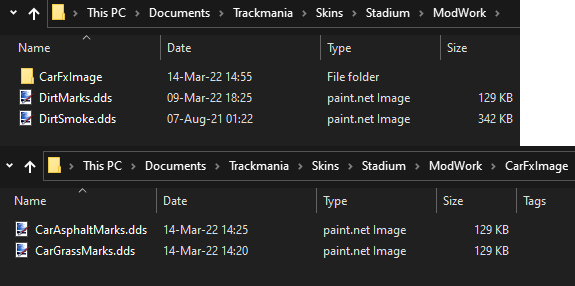
You can repeat the process for changing skids, just replace the files for the new skids. You do not need to restart the game or reload the map, changing skids will update live ingame. However, if you remove the skids, you will need to restart your game first.
How to uninstall
To remove the custom skid marks, either rename or remove the ModWork folder in Documents\Trackmania\Skins\Stadium. You will need to restart the game, otherwise skid marks will appear solid black.
You can also replace the skids with the Default.dds for each surface so you don’t have to restart the game. But keep in mind that this still overrides map mods.
How to create your own custom skid marks
Each surface includes a Default.dds file, which should be the original skids used by the game. You can use these as templates in any program that allows editing of DDS (DirectDraw Surface) files. Save the DDS files with DXT5 or higher versions.